DeepSeek Harness — what it is, why you need it, and how to wire it to the LiteAI gateway
Why a harness (wrapper layer) matters around DeepSeek: the agent loop, tool calling, streaming, retries, and token accounting. Step-by-step setup with the LiteAI gateway: the OpenAI-compatible endpoint api.liteai.tech/v1, an sk-bf-… key, picking a model, a curl smoke test, and a ready-to-use config example. Screenshot with a sample configuration.
DeepSeek Harness — what it is, why you need it, and how to wire it to the LiteAI gateway
DeepSeek is a model family with native tool calling: cheap, long-context, and predictable in its JSON output. That is exactly why autonomous agents are most often built on top of it. But the model itself is only the "brain." To turn it into a working instrument you need a wrapper layer — which is precisely what the community calls the harness.
What a DeepSeek Harness is, in plain language
The harness is a thin layer of code around the model call. It does not change the model itself — it makes the model usable in practice:
- The agent loop — "thought → called a tool → got the result → thought again," repeated until the task is solved.
- Tool calling — parsing the
tool_callsfrom the response, invoking the right function (search, bash, editor, browser), feeding the result back to the model. - Streaming and progress — incremental output over SSE, visibility into what the agent is doing right now.
- Retries and limits — handling 429/5xx with exponential backoff, a cap on the number of iterations, a budget ceiling per session.
- Token accounting — the
usagepayload on every request, per-session cost, hard caps on wall-clock time and money.
Why bother? Try wrapping a bare client.chat.completions.create() call in a naive loop and you will hit the three classic pain points:
- Rate limits and errors. DeepSeek (like any provider) will return 429 when you blow past the RPS or TPM ceiling. Without retry-with-backoff the agent dies mid-task.
- Context length. An agent accumulates a growing history of "thought → called tool → got result." Without trimming or compressing that history you will slam into the context-window ceiling.
- Loops and infinite runs. The model can get stuck: calling the same tool over and over, repeating the same step. You need a max-iterations cap and a stop condition.
The harness is standard practice. Every popular agent CLI/framework is, under the hood, a harness: Claude Code, OpenCode, Codex CLI, Aider, Droid, and dozens of libraries. Swapping to DeepSeek simply replaces the "engine": the same loop, the same tools — only the model now answers through DeepSeek, which cuts the per-token cost dramatically.
Setup: DeepSeek Harness through the LiteAI gateway
On to the practical part: how to wire a DeepSeek-powered harness up through our gateway, LiteAI. The idea is simple: you swap the base URL and the API key in your harness's config (or in any OpenAI-compatible client) for ours, and you leave the rest of the harness's own configuration alone — which models you pick, the temperature, the max iteration count, the tool registry. A screenshot of the custom provider liteai.tech configuration in the client is shown below: the provider name, the gateway base URL and your API key:
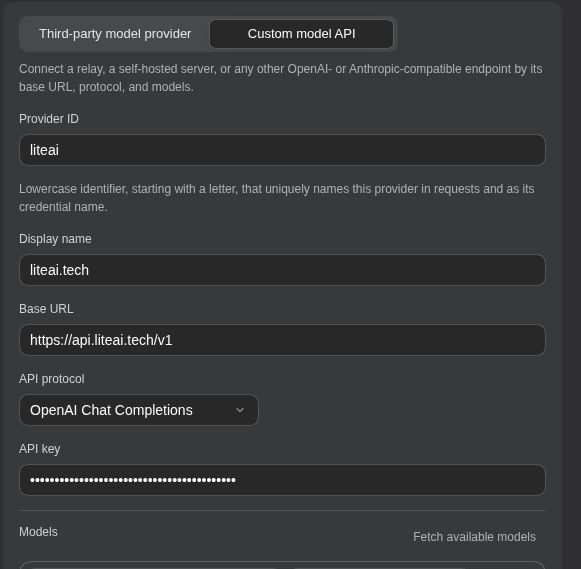
Step by step, it looks like this:
Get a LiteAI key. On the /pricing page, buy a token pack (starting at 30 ₽ per 1M). Right after payment, your inbox will contain a key of the form
sk-bf-….Confirm that DeepSeek is available on your plan. Which models are listed changes over time, so the fastest way to be certain is to query the catalog directly:
curl https://api.liteai.tech/v1/models \
  -H "Authorization: Bearer sk-bf-..." \
  | jq '.data[].id'
If DeepSeek shows up in the output, record the exact model id (
deepseek-chatfor the V3 series,deepseek-reasonerfor R1, or whatever variant your catalog actually uses) and drop it into the harness config. No DeepSeek in the list? Check the current catalog in the docs or ask us to enable the model you need on your plan.Point the harness at the gateway. Set the following in the environment variables or config file of whatever tool you use:
- Base URL:
https://api.liteai.tech/v1; - API key:
sk-bf-…; - Model: the exact id from step 2.
- Base URL:
Run a smoke test. A minimal request is enough to confirm that the connection is healthy:
curl https://api.liteai.tech/v1/chat/completions \
  -H "Content-Type: application/json" \
  -H "Authorization: Bearer sk-bf-..." \
  -d '{
    "model": "deepseek-chat",
    "messages": [{"role": "user", "content": "Answer in one word: hi"}],
    "max_tokens": 10
  }'
The response should include
choices[0].message.contentand ausageblock with the token counters.Verify tool calling. Send a request that declares a tool and confirm the model emits well-formed JSON inside
tool_calls— this is what the entire agent loop rests on:curl https://api.liteai.tech/v1/chat/completions \ -H "Content-Type: application/json" \ -H "Authorization: Bearer sk-bf-..." \ -d '{ "model": "deepseek-chat", "messages": [{"role": "user", "content": "What is the weather in Moscow?"}], "tools": [{ "type": "function", "function": { "name": "get_weather", "description": "Get current weather for a city", "parameters": { "type": "object", "properties": {"city": {"type": "string"}}, "required": ["city"] } }] }'Assemble the config. A minimal working example of a harness config bound to the LiteAI gateway:
{
  "provider": "openai-compatible",
  "base_url": "https://api.liteai.tech/v1",
  "api_key": "sk-bf-...",
  "model": "deepseek-chat",
  "temperature": 0.3,
  "max_steps": 25,
  "max_history_turns": 20,
  "timeout_seconds": 60,
  "max_retries": 3
}
Two of these parameters directly cure the pain points of the "bare" API:
max_stepsprevents the agent from looping forever (it stops on its own after 25 iterations), andmax_retries: 3handles 429s (retry with backoff is already built in to virtually every harness).
A word on model selection. For pure tool-calling agents, pick deepseek-chat — the V3 series responds faster and is more reliable at generating valid JSON. Reach for deepseek-reasoner (R1) when quality of reasoning matters: math, logic, complex multi-step problems. Details in the post about free-tier DeepSeek on OpenRouter.
Frequently Asked Questions
Do I need a separate DeepSeek account?
No. The whole request → response → token cycle goes through our gateway: you talk to LiteAI, LiteAI talks to DeepSeek. Your sk-bf-… key is the only secret in the entire chain.
Why not connect straight to api.deepseek.com? You can, and for many scenarios the direct route is faster. The LiteAI gateway earns its keep when you need any of: payment in rubles (a Russian card or SBP, no foreign BIN required); a single key covering multiple model families in one account (Claude + GPT + DeepSeek); or the absence of a VPN. If the direct route works for you, take it; if you want one key for everything, go through LiteAI.
Does streaming work?
Yes, SSE streaming in the OpenAI-compatible format. If your harness expects stream: true and reads the data: {...} events, it is already compatible — just change the base URL.
How do I compute the cost of a session?
Every response carries a usage block (prompt_tokens, completion_tokens, total_tokens). Sum total_tokens across every request in the session and multiply by the per-1M-token price for the model you used — that is the full cost. Most harnesses do this automatically and print the total at the end of the session.
What happens when I hit a 429?
It is the rate limit: you exceeded the allowed RPS or the TPM (tokens-per-minute) accumulation. The right reaction is already encoded in max_retries: 3: the harness applies exponential backoff (1s, 2s, 4s) and retries. If 429 keeps coming back after all retries are exhausted, wait 30–60 seconds and continue. The full catalog of codes and causes is in the Claude API errors article — the same logic applies to our endpoints.
Is prompt caching supported?
Yes, in the Anthropic-style format (cache_control markers), where the underlying model supports it. For DeepSeek through the OpenAI-compatible endpoint, the system prompt is cached automatically.
What does a typical session cost? For a code-agent session of 50–100 iterations: 200–500K tokens in total. At our 30 ₽/1M rate that is roughly 6–15 ₽. A full 30-minute session comes out to about 2–4 rubles. Cheaper? See what is actually free. Need more throughput? Step up to the 10M pack or higher.
What happens when the tokens run out? A 429 arrives with a "insufficient balance"-style detail (or equivalent). Replenish a pack on /pricing and carry on — the harness's history and settings survive; nothing to reconfigure.
Bottom line
DeepSeek Harness is not "yet another model" — it is the standard way to turn a cheap model into a working agent: the same tool-calling loop, the same streaming, the same retries, the same token accounting. The only difference is where the requests go: straight to api.deepseek.com (if you just want cheap inference), or through our LiteAI gateway (if you want to pay in rubles, carry one key for all the model families, or avoid the VPN).
Not sure which model or provider is right for your workload yet? Start with the Claude / GPT / DeepSeek comparison. Want to try DeepSeek for zero cost at all? Read the free models on OpenRouter post. And if you want to squeeze the token bill down in any harness you already use, read rtk, CodeGraph, and precise context.
Ready to try LiteAI?
An API key for 18 AI models — Claude, GPT, DeepSeek, Qwen — in 30 seconds, paid with USDT.